


Tools like Lovable, Bolt, and Claude Code have genuinely changed what’s possible for non-technical founders and builders, and I’ve seen people do remarkable things with them.
What gets missed in all the excitement though: when you have an engineering team, there are checks and habits that happen in someone else’s head before your product reaches users. When you're the builder, those checks now rest with you.
Pilots run through a pre-flight checklist before every flight, not because they’re inexperienced, but because the risks from skipping it are too high.
Here are 6 checks in plain English that are worth building into your habit before you next hit deploy.
#1: Know Where You Can Land If Things Go Wrong
The risk: You’re iterating fast, something breaks, and you can’t remember what was working. Or you can, but you’ve made so many changes since then that finding your way back feels impossible.
What to do: Before making any significant change, identify the current stable version of your app or website. Lovable calls this pinning, and it lets you mark a checkpoint you can always return to. Most tools have some version of this built in; just ask yours how to do it.
If your tool doesn’t have it, then ask the tool to set up a simplified version control workflow for you using Git. That way, you can just ask it to create a new snapshot whenever you want.
#2: No Loose Items in the Cockpit
The risk: API keys, passwords, and other sensitive values have a way of ending up exactly where they shouldn’t. Pasted into a chat prompt. Written directly into your code. Committed to your version control. Once a secret is in the wrong place, it can be exposed to anyone who can see your project, and depending on your setup, that could be anyone on the internet.
It’s easier than ever for bad actors to check for vulnerabilities on your app, using the same AI tools you’re building with.
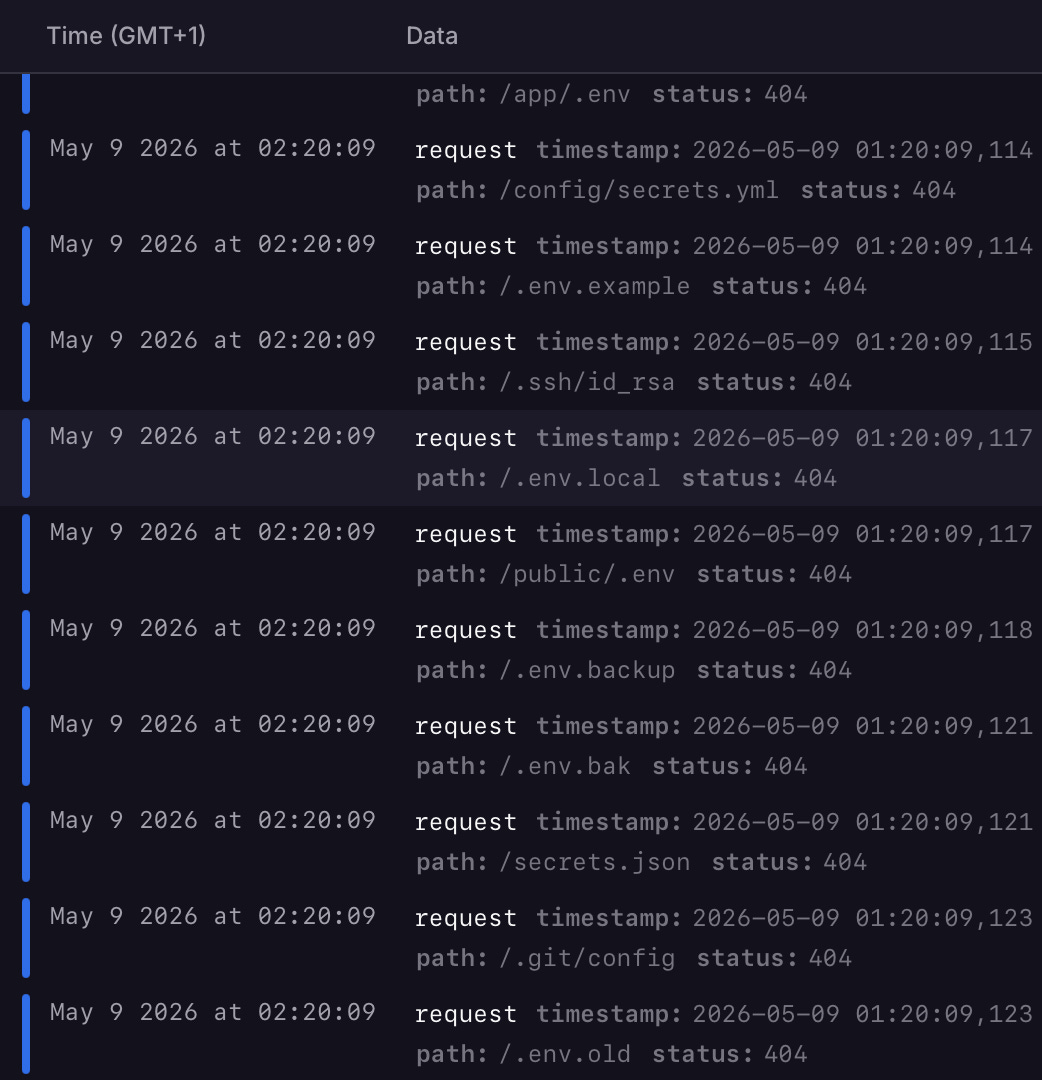
To give you a sense of how real this is: the screenshot below is from one of my own app logs. An automated vulnerability scanner probed for exposed files including .env, secrets.json, .ssh/id_rsa and .git/config, all in less than a second. These are exactly the files where sensitive info ends up when you're not careful.
The 404 status on each means none of them were accessible for my app, you should confirm for yours.
What to do: Never paste passwords, API keys or other sensitive information directly into a chat prompt, and ensure your coding tool never writes any of these into your code or version control.
Most tools have a dedicated place to store sensitive values separately from your code so they stay protected even if your code is exposed. Find out how it works and use it.
#3: Are You Flying Private or Public?
The risk: Many AI builder platforms deploy apps publicly by default. Your app may already be live and findable before you have even thought about who should have access to it.
What to do: Before sharing anything with users, check your visibility and access settings. Is this project public or private? Does accessing it require a login? Lovable apps, for example, are accessible to anyone with the URL unless you configure otherwise.
And don’t stop at the app itself. Your data store, which is where your users’ information actually lives, can also be publicly accessible by default if it wasn’t configured correctly when it was set up. If your app is the front door, your database is the back door.
#4: Check Your Engine and Parts Before You Take Off
The risk: Your app is likely built on top of quite a few third party libraries. Using well-tested frameworks is actually safer than building everything yourself. The tradeoff is that their popularity also makes them a target for hackers.
Most new builders set things up once when their project starts and never revisit them, meaning the components under the hood quietly fall out of date (and exposed to an increasing number of security risks).
What to do: Get into the habit of running a security audit before you deploy. This can be manual, but it’s even better if it’s automated. A simple prompt to use if you’re using AI to code: “Can you run a dependency audit on my project and let me know if anything needs to be updated for security reasons?”
This won’t find everything but it’s a start.
#5: Always Try New Things Out In the Flight Simulator First
The risk: Whenever you want to make changes to your app, many builders just start making those changes directly in the live app, that their real users are already on. Don’t do this.
Every experiment, every half-finished feature, and every bug introduced along the way is happening in front of your most valuable audience.
What to do: Ask your tool to set up a separate test environment for your project. This is a copy of your app that behaves like the real thing but has no real users on it. Think of it as your flight simulator: you can practice, break things, and try new maneuvers without any consequences for real passengers.
#6: Once the Doors Are Closed, Confirm Your Flight Manifest
The risk: Especially on marketing and landing pages, links break quietly. A button that does nothing when clicked. A nav item pointing at a URL you renamed three iterations ago. A password reset link that doesn’t actually send an email.
What to do: Start by asking your tool to set up an automated link checker that crawls your pages and surfaces broken URLs. This is quick and catches the obvious stuff, and is worth running before every single deployment.
Then do spot manual checks for anything critical that automation can’t reliably verify. Click through your key flows the way a real user would: does sign-up work? Does billing go through? Are user emails actually landing in inboxes? Are permissions behaving as expected?
Users, unless highly engaged, won’t report when they break. They’ll just move on. No matter how good your site or copy is, broken flows are something you want to avoid at all costs.
Summary
As these are things that you need to integrate into your build, deploy, validate workflow, automation is likely to be a significant benefit, and with AI you can set up simple automations incredibly easily such that there is really no excuse.
You also don’t want to be this guy, blaming a tool for what is ultimately your responsibility.
This list is not meant to be a kitchen sink of everything you SHOULD do, it just identifies some easy things you CAN do yourself to reduce some risk. There are many more pre-launch security and operational considerations worth investigating.
If you’d like someone to run through those checks with you or do a checkup of your application, that’s something I help teams with via jamar.io.
If you found this useful, my 5 Smarter Ways for Non-Technical Folks to Work with Engineering post covers the other side of this: what to do once you bring engineering help into the picture.